

Reading an incident
A walk down the incident page, panel by panel, and what to do with each one.
The incident page is built to be read top to bottom. It moves from what happened through what we observed to what we think it was — in that order deliberately, so the evidence lands before the interpretation.
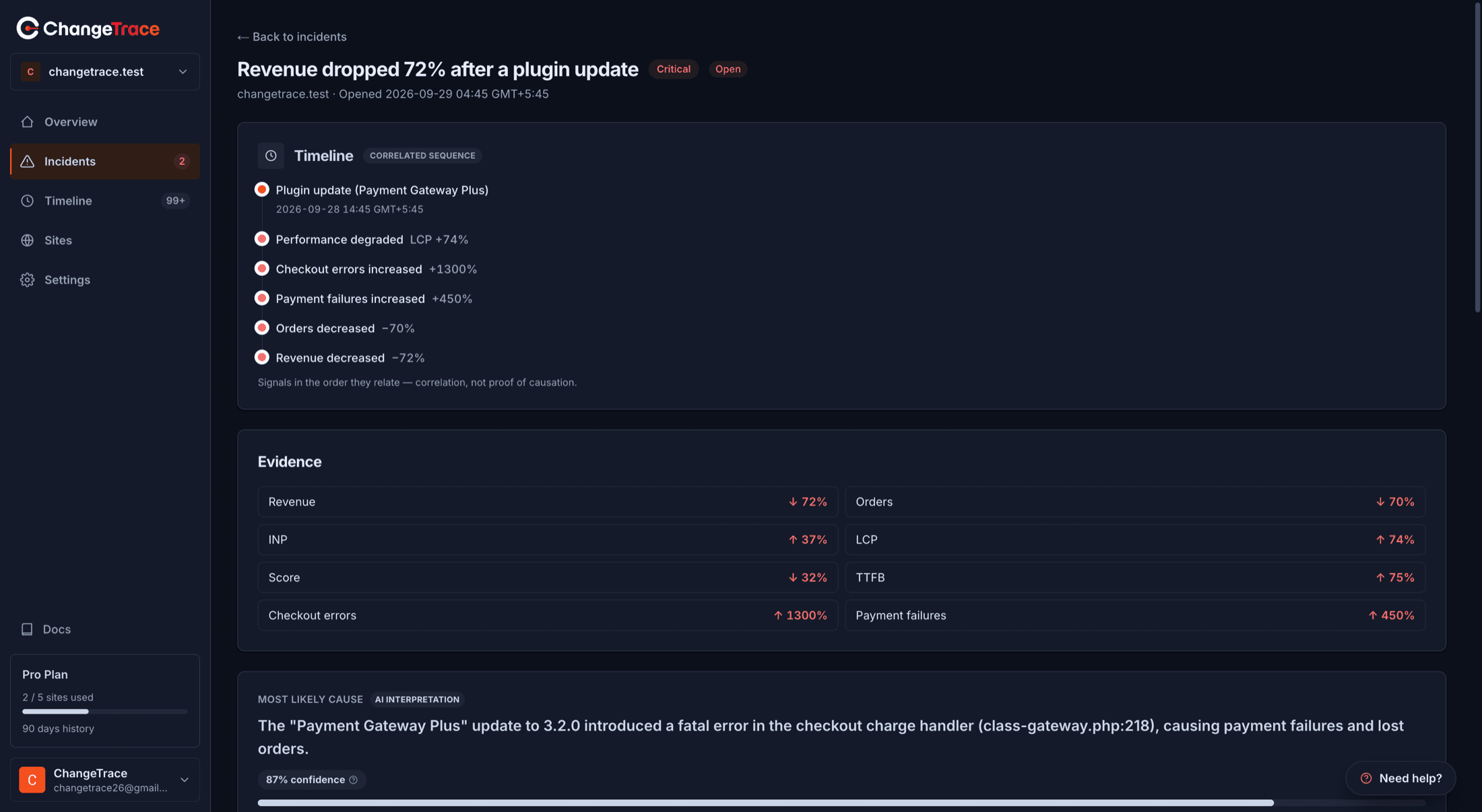
Header
Title, severity chip, status, the site, when it opened, and when it resolved if it has.
Outage panel
Only on outage incidents. Marked "Observed from outside" — it comes from ChangeTrace loading your site, not from the plugin.
Shows the failure mode, what was actually seen, when it started (and after how many failed checks), when it recovered and for how long it was down, and which URL was checked.
It then says one of two things:
- Recent changes are being ranked below as possible causes, or
- "No site change is implicated", with the reason.
That second case is not a missing feature. Uptime and outages explains why some failures get no ranked causes at all.
Correlated sequence
A vertical timeline of the signals in the order they relate to each other — for example: plugin updated → error rate rose → orders fell.
Colour tells you the kind: brand for a change, red for something degrading, grey for neutral context.
The footer says "Signals in the order they relate — correlation, not proof of causation." Read it as a sequence to investigate, not a chain of proof.
Evidence
Measured movements as up/down percentage chips — commerce figures and, where available, performance metrics. Red when the movement is a concern, green when it moved the good way.
This panel is observation, not opinion. Nothing here is inferred.
Most likely cause
Tagged "AI interpretation" — the first panel on the page that is interpretation rather than measurement.
Shows the top-ranked change, a confidence percentage and a bar. The confidence has a tooltip worth internalising:
Confidence reflects how strongly the available timing and correlated signals support this hypothesis — not statistical certainty.
An 80% confidence means the timing fits well, not there is an 80% chance this is the cause.
If it is empty, you will see either "Not attributed to a site change" (an infrastructure outage) or "No hypotheses yet — correlation runs on a schedule after an incident opens", which means wait up to 30 minutes.
Ranked causes
The full list, numbered, each with a description and score. Useful when the top candidate is something you know is innocent — the second is often what you want.
Performance impact
Appears when ChangeTrace has before/after page-speed measurements around a change: per metric, the before value, the after value, the percentage change and a tone chip.
Footer: "Shown as correlated evidence — not proof this change caused the incident." More →
AI explanation
Nothing runs until you click. Generate AI explanation produces a written summary from the evidence already collected, with a confidence chip, a bulleted evidence list, a recommended next step and stated limitations.
Evidence, linked
The specific events and metric readings attached to this incident, green-checked. This is the receipt — it is where you go when you want to see the actual record rather than the summary.
Ask ChangeTrace
A question box scoped to this incident and site. Suggested prompts include "Why did my sales drop?" and "What changed before this incident?". Follow-up questions keep the thread; the number allowed depends on your plan.
A sensible way to work through it
Check the outage panel first
If your site was down, that is the story. Stop there.
Read the evidence before the causes
Know what actually moved before reading what might have caused it.
Take the top cause as a lead
Check the ranked list for anything you recognise. Timing rules a lot in and out quickly.
Cross-check on the Timeline
Timeline shows everything in that window, including changes that were never ranked.
Ask, if it is still unclear
Generate the AI explanation, or use Ask ChangeTrace. Still stuck — the Need help? widget attaches the incident to your message automatically.
You cannot resolve an incident yourself
There is no resolve button. Outage incidents close themselves; sales incidents stay open. Why, and what to do instead →